

Your Dyson Supersonic sits lifeless on the counter. No lights, no hum, no response when you press the power button. It worked yesterday, but now it won’t turn on at all. You’re not alone. A Dyson hair dryer that won’t power up is a common issue, but the cause can range from a simple fix to a complex internal failure.
The good news? Most problems have clear solutions, and this guide walks you through every step to get your dryer back in action. We’ll cover how to rule out power issues, reset safety features, clean critical components, and diagnose internal failures like blown thermal fuses or motor blockages.
Test the Power Outlet First
Before touching the dryer, confirm the outlet is working. Plug in another device like a phone charger or lamp. If it doesn’t power on, check your home’s circuit breaker or GFCI outlet, especially if the bathroom or bedroom tripped. Try a different room if needed.
Even if the outlet seems fine, test multiple ones. Some Dyson users report the dryer fails on certain circuits due to voltage fluctuations or shared loads. A stable 120V AC supply is essential.
Pro Tip: Avoid using extension cords or power strips. Dyson recommends plugging directly into a wall outlet to ensure full power delivery.
If other devices work but your dryer still won’t turn on, move to the next step.
Reset the ALCI Plug
Your Dyson Supersonic power cord has a built-in ALCI (Automatic Leak Current Interrupter) plug that cuts power during electrical faults, like a mini GFCI. A tripped ALCI can make the dryer appear dead, even with a good outlet.
How to Reset the ALCI Plug
- Plug the dryer into a working outlet.
- Press the yellow test button on the plug.
- Unplug the dryer.
- Press the red reset button.
- Reconnect and try turning it on.
If the dryer powers up, the ALCI was tripped, likely due to a power surge or moisture exposure.
Warning: If the red button won’t stay in or trips again immediately, stop using the dryer. This indicates a serious electrical fault. Contact Dyson Support.
Inspect the Power Cord for Damage
A frayed, kinked, or crushed cord can break the circuit. Check the entire length for cuts, cracks, or exposed wires, burn marks near the plug or dryer base, and a loose connection where the cord meets the handle. Pay close attention to the ALCI plug and the base connection, as these are common stress points.
If you see any damage:
- Do not use the dryer.
- Do not attempt to repair the cord yourself. It contains safety components and is not user-serviceable.
- Contact Dyson Support for a replacement. They will ship a new cord or guide you through warranty options.
Clean the Air Filter and Airflow System
A clogged filter triggers overheating protection, which can prevent startup. Even if the dryer worked fine before, accumulated lint and hair reduce airflow, causing the system to shut down permanently, especially if the thermal fuse blew.
Cleaning the Filter
- Remove the filter guard at the base of the handle by twisting it counterclockwise.
- Pull out the foam filter.
- Rinse under lukewarm water or wipe with a microfiber cloth.
- Let it dry completely, at least 10 minutes.
- Reinsert and twist the guard back into place.
Why this matters: Many users report their dryer came back to life after cleaning, especially if it had previously shut off mid-use. This suggests prior overheating events damaged internal components.
Prevention: Clean the filter every 2 to 3 uses. It takes 30 seconds and can save your dryer from early failure.
Diagnose Internal Thermal Fuse Failure
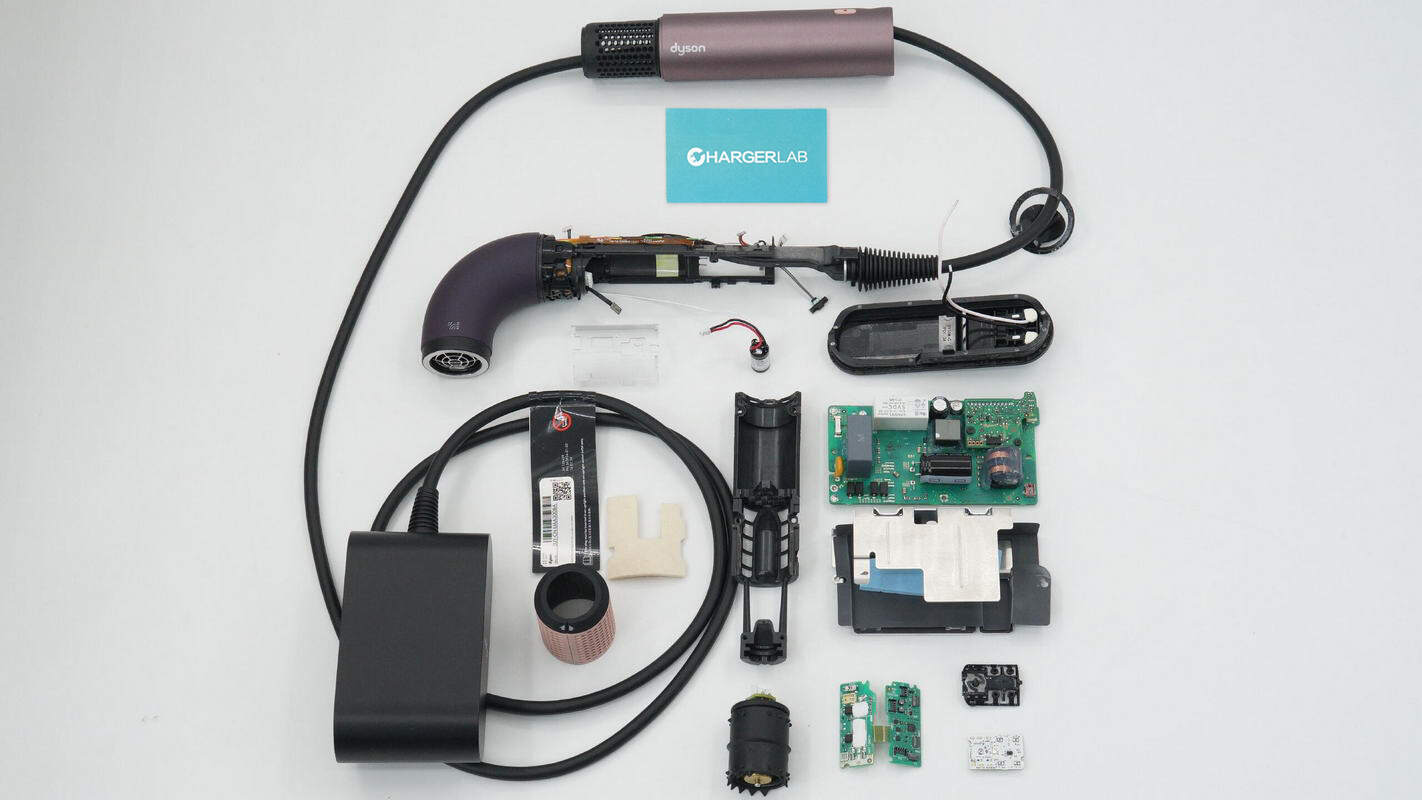
If the dryer still won’t turn on, no lights, no sound, the thermal fuse or thermal resistor may be blown. This safety device cuts power permanently during extreme overheating and does not reset.
Signs of a Blown Thermal Resistor
- No response after outlet and ALCI checks
- Dryer was used with a dirty filter
- Previous shutdowns during long styling sessions
- Unit feels warm but unresponsive
How to Test the Thermal Resistor
You will need a multimeter and basic disassembly tools.
- Unplug the dryer.
- Remove the C-clamp and metal ring at the base of the handle using a pry tool.
- Peel back the shrink-wrap insulation to expose internal wiring.
- Locate the two thermal resistors near the motor leads.
- Set multimeter to continuity or resistance mode.
- Test each resistor. A good resistor shows low resistance near 0 ohms. A blown resistor shows infinite resistance with no continuity.
Replacing the Thermal Resistor
If one shows no continuity, it has failed.
- Buy an 184°C thermal resistor. Cost is $3 to $8 online.
- Desolder the old one.
- Solder in the new resistor.
- Use needle-nose pliers as a heat sink on one terminal to avoid damaging nearby components.
- Cover connections with heat-shrink tubing.
- Reassemble and test.
Tools Needed:
- Multimeter
- Small pry tool
- Soldering iron and solder
- Heat-shrink tubing
Skill Level: Intermediate. Only attempt if you have soldered before.
Success Rate: High. Verified repairs restore full function, including lights, motor, and heat.
Clear Motor and Heating Element Blockages
Restricted airflow does not just cause shutdowns. It can kill the motor. If your dryer showed intermittent operation, reduced airflow, or flashing lights before failing, debris may be jamming the motor or heating chamber.
How to Clear Blockages
- Remove the handle using T4, T6, and T8 Torx bits.
- Twist the front housing counterclockwise to detach.
- Inspect the motor housing in the handle and heating element in the head for hair strands, lint buildup, and styling product residue.
- Use compressed air or a soft brush to clean.
- Reassemble carefully. Parts fit tightly.
Warning: Do not force components. Internal wiring is delicate.
This fix often resolves 1 or 2 white flashing lights, which indicate airflow or heating issues.
Check for Circuit Board Failure

Two circuit boards control your Dyson. The motor control board is in the handle, and the thermal regulation board is near the heating element. If either fails, the dryer won’t turn on or shows flashing lights.
How to Diagnose Circuit Board Issues
- After disassembly, inspect both boards for burn marks, corrosion, and swollen capacitors.
- Use a multimeter to test continuity on key traces. This is for advanced users only.
Repair Options
- Replace the board. Motor control board costs about £90 in the UK. Heating element assembly with board costs about £40.
- Professional installation is required. Micro-soldering is delicate.
DIY Risk: High. Mistakes can destroy the board. Unless you are experienced, skip this repair.
Evaluate Motor Failure
If the dryer shows faint lights but the fan won’t spin, the motor may be dead.
Symptoms of Motor Failure
- No airflow despite power signs
- Dryer gets warm but doesn’t blow
- Increasing shutdowns before total failure
Motor Replacement
- Motor replacement costs £65 in the UK.
- Requires full disassembly.
- Common in older units, 3 or more years old.
Decision Point: If the motor failed due to chronic overheating from a dirty filter, consider whether repair is worth it or if a refurbished unit is a smarter investment.
Interpret Flashing Light Codes
No lights points to total power loss. But flashing lights tell a different story.
| Flash Pattern | Likely Cause |
|---|---|
| No lights | Blown thermal fuse, no power input |
| 1 white flash | Motor fault or circuit board issue |
| 2 white flashes | Airflow blockage or heating element problem |
| 3 or more flashes | Internal error. Contact Dyson. |
User Insight: One owner reported 2 white flashes after cleaning. The problem persisted, leading to a free exchange under warranty.
If you see any lights, the dryer is getting power. Focus on airflow, motor, or board issues.
When to DIY vs. Call a Pro
Not every fix should be done at home.
DIY Is Safe If
- You are resetting the ALCI.
- You are cleaning the filter.
- You are replacing a thermal resistor, if experienced.
Call Dyson Support If
- The dryer is under 2-year warranty.
- You see burn marks or melted parts.
- You are uncomfortable with disassembly.
- The ALCI trips repeatedly.
Repair vs. Replace Decision
| Option | Best For |
|---|---|
| DIY thermal fuse fix | Skilled users. Low cost. |
| Official Dyson repair | Out-of-warranty units. Peace of mind. |
| Refurbished Dyson | Cost savings. Full warranty. |
| New model (HD08/HD15) | Latest features. Long-term reliability. |
Expert Tip: In the UK, refurbished Dysons go for $80 to $90, sometimes cheaper than a motor repair. Weigh the cost before opening the handle.
Contact Dyson Support for Help
Dyson offers free diagnostics and repair options, even out of warranty.
Support Numbers
- US: 1-866-693-9766
- UK: 0800-298-0298
- CA: 1-877-397-6622
- AU: 1800 239 766
- NZ: 0800 397 667
What Dyson Offers
- Free repair or replacement if under warranty.
- Certified repair service for out-of-warranty units.
- Refurbished exchange or discount on new models.
- Shipping label for return.
Why go official? You get access to proprietary parts, no risk of accidental damage, and you avoid voiding future coverage.
Prevent Future Failures
A little care goes a long way.
Maintenance Routine
- Clean filter every 2 to 3 uses.
- Wipe intake and outlet grilles weekly.
- Use compressed air monthly to clear internal dust.
Usage Tips
- Do not run continuously for over 30 minutes.
- Never place on fabric or carpet while operating.
- Store in a dry, dust-free area.
- Use cool or warm settings when possible.
Safety
- Keep away from sinks and showers.
- Use only in GFCI-protected bathrooms.
Final Checklist: What to Do Now
- Test the outlet with another device.
- Reset the ALCI plug (red button).
- Inspect and clean the filter.
- Check power cord for damage.
- If still dead, consider thermal fuse failure.
- Contact Dyson if under warranty or unsure.
Frequently Asked Questions About Dyson Hair Dryers That Won’t Turn On
Why is my Dyson hair dryer completely dead with no lights?
A completely dead dryer with no lights usually indicates a blown thermal fuse, no power reaching the unit, or a serious internal electrical fault. Start by testing the outlet, resetting the ALCI plug, and checking the power cord for visible damage. If these steps fail, the thermal resistor inside the handle likely failed and needs replacement.
Can I fix a Dyson hair dryer that won’t turn on myself?
You can fix some issues yourself if you have the right skills. Resetting the ALCI plug and cleaning the filter are simple DIY steps. Replacing a thermal resistor is possible if you have soldering experience and the proper tools. However, circuit board repairs and motor replacements are best left to professionals due to the delicate micro-soldering involved.
How much does it cost to repair a Dyson hair dryer that won’t turn on?
DIY repair costs under $10 for a thermal resistor. Professional repair through Dyson varies by issue but can range from $50 to $150. A refurbished Dyson Supersonic costs $200 to $250, while a new model runs $350 to $450. Consider these options against the age and condition of your unit.
Does Dyson offer warranty coverage for a hair dryer that won’t turn on?
Dyson Supersonic hair dryers come with a 2-year limited warranty. If your unit is within warranty and won’t turn on, contact Dyson Support for free repair or replacement. Even out-of-warranty units may qualify for Dyson’s certified repair service or a refurbished exchange.
What do flashing lights mean on my Dyson hair dryer?
Flashing lights indicate specific issues. No lights means complete power failure. One white flash suggests a motor fault or circuit board issue. Two white flashes point to airflow blockage or heating element problems. Three or more flashes signal an internal error requiring professional diagnosis.
How do I prevent my Dyson hair dryer from failing to turn on in the future?
Prevent failures by cleaning the filter every 2 to 3 uses, wiping intake and outlet grilles weekly, and using compressed air monthly to clear internal debris. Avoid running the dryer continuously for more than 30 minutes, never place it on fabric while operating, and store it in a dry, dust-free area.
Key Takeaways for Fixing Your Dyson Hair Dryer
A Dyson hair dryer that won’t turn on is not always a lost cause. Start simple by testing the outlet and resetting the ALCI plug, then work through cleaning the filter and inspecting the cord. If these steps fail, internal components like the thermal resistor may need replacement. For complex issues like circuit board or motor failure, weigh the cost of repair against buying a refurbished or new unit.
With proper care, including regular filter cleaning and avoiding extended use, your Supersonic can last for years. If your dryer is under warranty, contact Dyson Support first for free service. For out-of-warranty units, the DIY thermal resistor fix offers a low-cost solution, while professional repair provides peace of mind.


