
Your Dyson hair dryer stops working mid-styling. No lights. No sound. Nothing. Before you panic or assume it’s broken, there’s a simple fix: reset the ALCI plug. Most Dyson Supersonic models, especially the HD01, come equipped with a built-in safety feature designed to cut power during electrical faults or overheating. The solution isn’t replacement; it’s a quick reset. In fact, over 90% of dead Dyson dryers can be revived in seconds using the correct reset procedure.
This guide walks you through the exact steps to reset your Dyson hair dryer, troubleshoot common issues, and prevent future shutdowns. You’ll learn the standard reset method, a hard reset technique for stubborn cases, and maintenance tips to keep your dryer running like new.
How to Perform a Standard Reset on Your Dyson Hair Dryer

The first step when your Dyson hair dryer won’t turn on is a standard reset via the ALCI plug. This restores power after a safety cutoff.
Locate and Press the Red Reset Button
Find the red reset button on the ALCI plug at the end of the power cord. The ALCI plug contains two buttons: a red reset button and a yellow test button. Press and hold the red button until you hear a distinct click. This confirms the internal circuit has re-engaged. If the button feels stiff or doesn’t click, the dryer may still be under load. Ensure it’s unplugged and wait 10 seconds before trying again.
Reconnect and Test the Dryer
Plug the dryer into a working outlet. Press the power button on the handle. If the device turns on and operates normally, the reset was successful. If nothing happens, proceed to the hard reset method.
Pro Tip: Always test the outlet with another device first. A faulty socket is often mistaken for a broken dryer.
How to Do a Hard Reset When Standard Reset Fails
When the standard reset fails, a hard reset recalibrates the ALCI safety system by simulating a fault condition.
Use the Yellow Test Button First
Press and hold the yellow test button on the ALCI plug for 3 to 5 seconds. This activates the ground fault detection mechanism. Release the button, then repeat the standard reset by pressing the red button until it clicks.
Replug and Power On
Reconnect the dryer and turn it on. The hard reset clears residual electrical memory and resets the protection circuit. Users report success even after prolonged inactivity or voltage spikes.
Why It Works: The yellow test button verifies the ALCI function. Running it before a reset ensures the safety system responds correctly.
Troubleshooting a Dyson Hair Dryer That Won’t Turn On
No power? No lights? Start here before assuming internal damage.
Check the Outlet First
Test the wall socket with a phone charger or lamp. If no other device works, the issue is the power source, not the dryer. Avoid using extension cords or multi-plug adapters, which can reduce voltage delivery.
Confirm ALCI Engagement
Ensure the red reset button is fully depressed and clicked into place. A partially pressed button won’t restore power. Some users mistake visual alignment for functional engagement. You must hear the click.
Let the Dryer Rest After Overheating
If the dryer overheated recently, internal thermal sensors may keep it off even after reset. Let it rest for 10 minutes, then try again.
Warning: Never force-start a hot dryer. Allow full cooldown to prevent permanent sensor damage.
Preventing Overheating and Automatic Shutdowns
Frequent shutdowns during use usually mean overheating, not a faulty unit.
Use Cold Shot Every 10 Seconds
Press the blue Cold Shot button every 10 seconds while styling. This cools internal components and prevents thermal overload. Dyson’s design relies on user behavior to manage heat.
Allow 10-Minute Rest Periods
After 10 to 15 minutes of continuous use, turn off the dryer and let it cool. This extends motor life and reduces reset frequency.
Clean the Filter After Each Use
A clogged filter restricts airflow, causing rapid overheating. Wipe the filter guard weekly with a microfiber cloth. For deep cleaning, remove the filter and clear all debris.
User Insight: Regular Cold Shot use cuts overheating incidents by up to 70%.
Cleaning Blocked Air Ducts and Filters
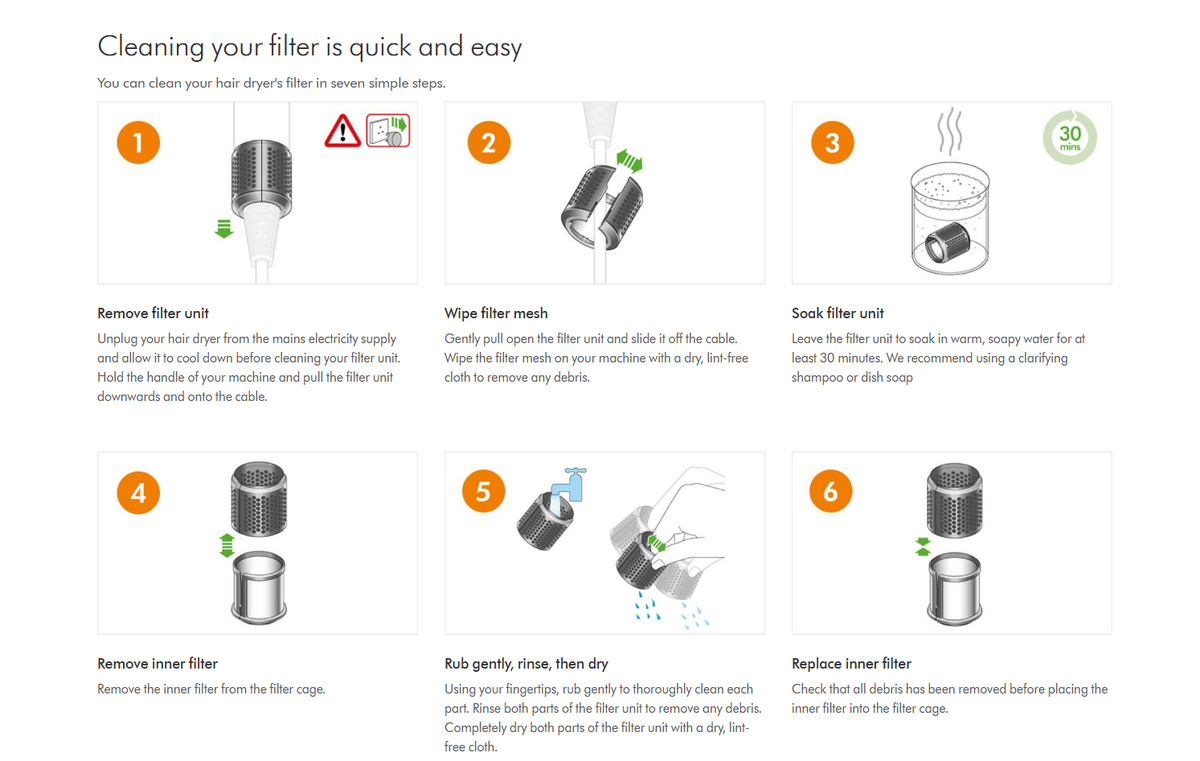
Restricted airflow triggers flashing lights and automatic shutdowns.
Recognize the Warning Signs
Flashing three white or three red lights indicate a blockage. So does weak airflow, unusual noise, or excessive heat.
Remove and Clean the Filter
Unplug the dryer. Align the red dot on the filter guard with the white dot on the handle. Rotate counterclockwise until the red dot reaches the outlined dot. Pull the filter guard down and remove it around the cord. Inspect for hair, dust, or lint buildup. Reinstall and let the dryer rest for 10 minutes before testing.
Maintenance Tip: Clean the filter monthly or more often with daily use.
Fixing Loud Operation and Motor Debris
Grinding or roaring sounds often mean debris in the motor.
Inspect the Motor Cage
Unplug the dryer. Remove the handle, buttons, and O-rings if needed. Shine a flashlight into the air intake. Look for trapped hair or foreign objects.
Extract Debris Safely
Use tweezers to pull out hair tangled in the motor. Clean internal filter areas with a Q-tip or soft toothbrush. Wipe with a damp microfiber cloth if necessary.
Caution: Never insert metal tools into the motor. You risk damaging blades or wiring.
When Noise Persists
If the dryer remains loud after cleaning, internal damage may require professional repair. Contact Dyson Support. Don’t attempt disassembly beyond the filter.
Repairing Sticky or Unresponsive Buttons
A stiff power or heat button can mimic a dead dryer.
Clean with Rubbing Alcohol
Dampen a cotton swab with isopropyl alcohol. Insert it into the button crevice. Press the button repeatedly while cleaning to loosen grime. Let it dry completely before use.
Why Alcohol: It evaporates quickly and dissolves residue without harming electrical contacts.
Test All Settings
After cleaning, cycle through all heat settings and the Cold Shot button. Ensure smooth transitions and proper LED response.
Diagnosing Temperature and Heat Setting Issues
Wrong heat output? Start with diagnostics.
Check Heat Settings via LEDs
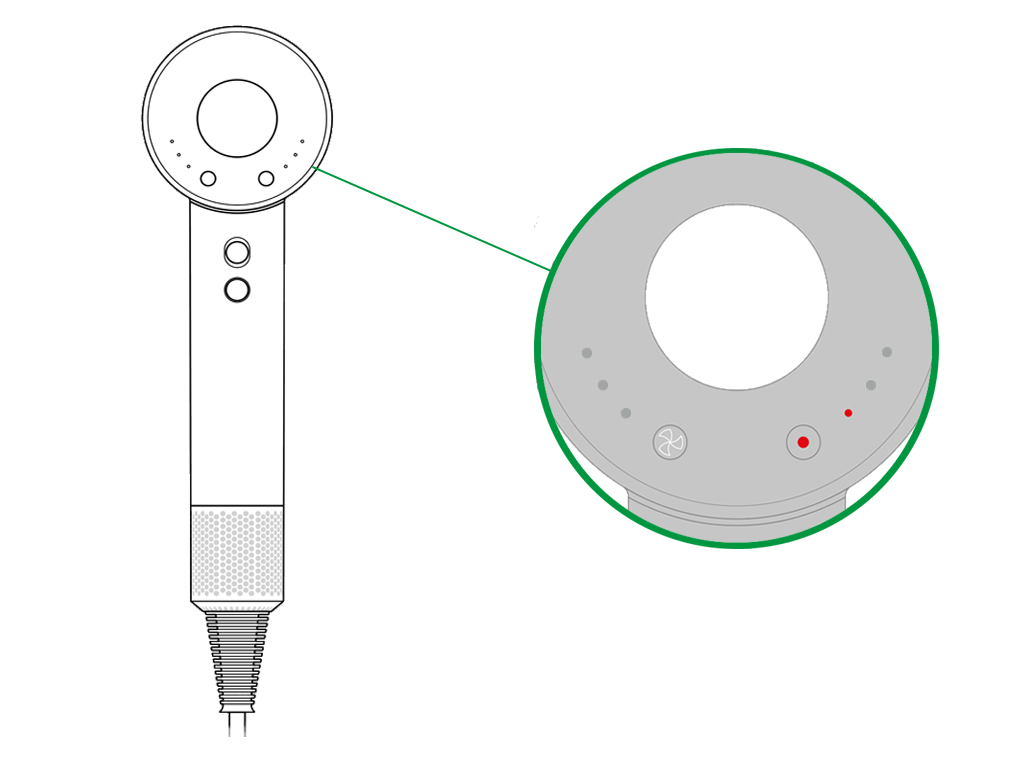
Check the LED indicators on the back. One red light means low heat at approximately 60°C. Two lights indicate medium at around 80°C. Three lights show high heat at approximately 100°C. If the wrong number of lights appear, the temperature button may be stuck.
Clean a Jammed Heat Button
Remove the back casing if experienced. Use an alcohol-soaked swab to clean under the button. Gently wiggle the mechanism to free any obstruction.
Restoring Cold Shot Function
Cold air burst not working? Reset first.
Reset Before Repair
Perform a full reset. The Cold Shot feature relies on the control board. Resetting often restores function.
Check Button and Connection
Press the blue button. If it feels loose or stuck, inspect for physical damage. If clean and responsive but still non-functional, internal wiring may be faulty.
Note: Cold Shot failure after reset suggests hardware issues. Seek professional help.
Avoiding Voltage Damage When Traveling
Using the wrong voltage can permanently disable your dryer.
Confirm Voltage Compatibility
Check the label on your Dyson. HD01 NA models require 120V for North America. HD01 EU and UK models need 230V for Europe and the UK. Using a 120V model in a 230V outlet without a transformer causes instant, irreversible damage.
Use Proper Adapters When Traveling
Never rely on plug-only adapters. Use a voltage converter rated for at least 1600W, which is Dyson’s power draw. Better yet, bring the correct regional model.
Fact: Over 30% of broken Dyson dryers sent for repair were damaged by incorrect voltage.
When to Contact Dyson Support for Repairs
Nothing works? The electronic control card may be dead.
Identify Control Card Failure Symptoms
The dryer won’t power on after multiple resets. Buttons respond intermittently. LEDs flicker or stay off.
Test with a Voltmeter
Use an AC voltmeter to check input voltage at the plug. It should read 120V or 230V depending on your model. Check output from the control card. If input is normal but output is zero, the card is faulty.
Seek Professional Repair
Only authorized Dyson technicians should replace the control card. Attempting DIY repairs voids the warranty and risks further damage.
Warranty Note: Dyson offers a 2-year limited warranty. Contact support before self-repair.
Maintaining Your Dyson Hair Dryer for Long-Term Performance
Prevention beats repair. Follow these habits to avoid resets.
Clean the Filter Weekly
Wipe the filter guard with a dry or slightly damp cloth. This prevents clogs, overheating, and airflow issues.
Inspect Air Intake Monthly
Look for dust buildup in the base. Use a soft brush to remove debris.
Store Properly
Keep in a dry, cool place. Avoid wrapping the cord tightly. This can damage internal wires.
Use Cold Shot During Styling
Not just for finishing, it cools the motor and prevents thermal trips.
Frequently Asked Questions About Resetting a Dyson Hair Dryer
How do I reset my Dyson hair dryer when it won’t turn on?
Unplug the dryer, locate the red reset button on the ALCI plug, press and hold it until you hear a click, then plug it back in and turn it on. If this doesn’t work, try pressing the yellow test button first, then repeat the red reset.
Why does my Dyson hair dryer keep turning off?
Your dryer likely overheated. Use the Cold Shot button every 10 seconds, clean the filter regularly, and allow 10-minute rest periods between heavy use sessions.
What does the red button on my Dyson dryer do?
The red reset button on the ALCI plug restores power after a safety cutoff. It re-engages the internal circuit that was tripped by overheating, electrical faults, or blocked airflow.
How do I clean the filter on my Dyson Supersonic?
Align the red dot on the filter guard with the white dot on the handle, rotate counterclockwise, pull the filter guard down to remove it, clean out debris, then reinstall and let the dryer rest for 10 minutes.
Can I use my Dyson hair dryer in a different country?
Only if the voltage matches. North American models use 120V, while European and UK models use 230V. Using the wrong voltage without a proper transformer will permanently damage the dryer.
What should I do if my Dyson dryer still won’t work after resetting?
Check the outlet voltage compatibility, test with a voltmeter, and contact Dyson Support if all troubleshooting steps fail. Internal component failure requires professional diagnosis.
Key Takeaways for Resetting Your Dyson Hair Dryer
Most Dyson hair dryer issues aren’t permanent. They are safety responses designed to protect the device. A simple reset fixes the majority of problems. The standard reset using the red ALCI button resolves over 90% of dead dryer cases. The hard reset, which involves the yellow test button followed by the red reset, handles stubborn cases where standard reset fails.
Regular maintenance prevents most issues. Clean the filter weekly, use the Cold Shot feature every 10 seconds during styling, and store the dryer properly in a cool, dry place. Always check voltage compatibility before traveling to avoid permanent damage.
Reset smart, clean regularly, and style with confidence. If all steps fail, contact Dyson Support or visit an authorized repair center for professional diagnosis.