
If your Dyson Supersonic hair dryer isn’t performing like it used to, slower drying times and strange noises are likely caused by a clogged filter. The filter at the base of the handle is essential for maintaining proper airflow and protecting the motor from dust, hair, and styling product residue. Over time, this filter collects debris, restricting airflow and triggering overheating or shutdowns. Cleaning it regularly isn’t just recommended, it’s critical for maintaining your dryer’s performance and longevity. This guide covers exactly how to clean your Dyson hair dryer properly, avoid common mistakes, troubleshoot issues, and keep your device running like new.
Remove and Clean the Filter Cage
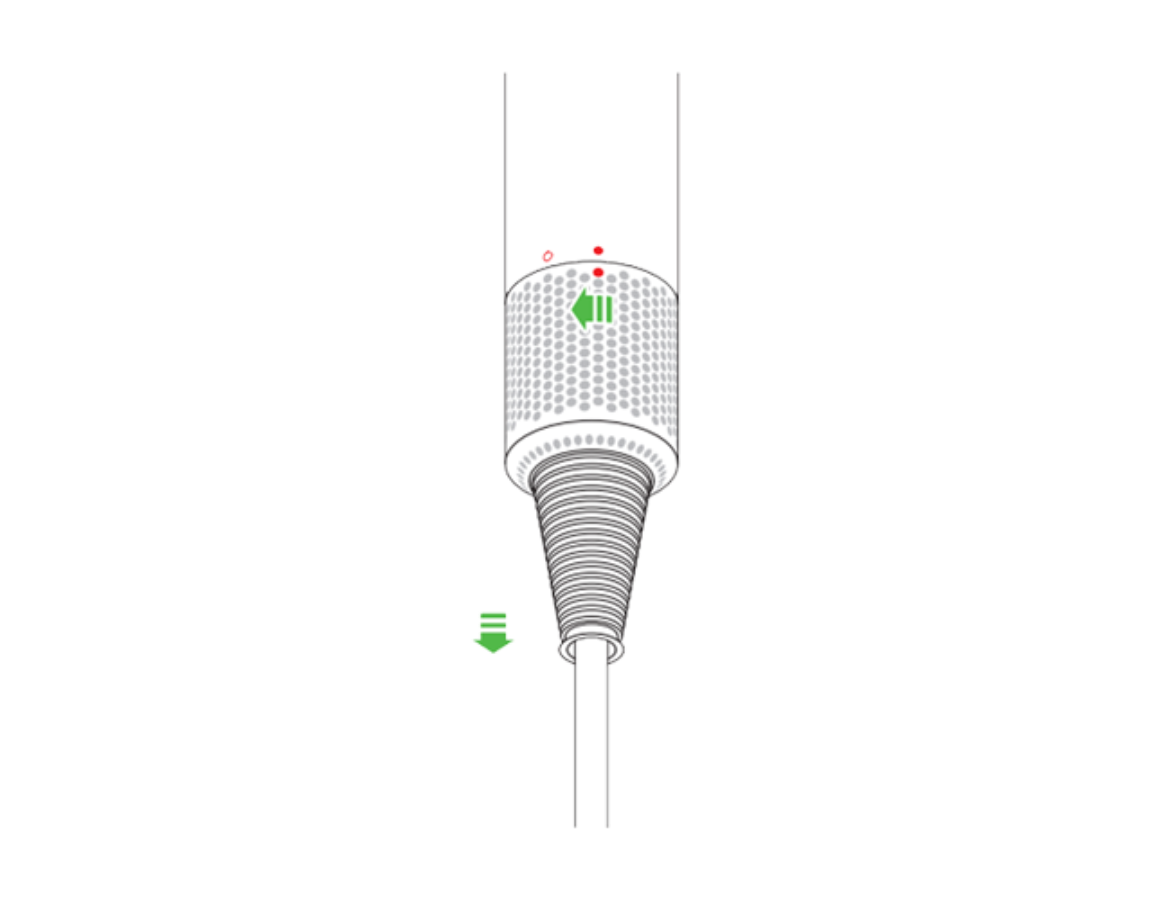
The filter cage is the most important component to maintain on your Dyson Supersonic. Located at the base of the handle, it traps lint, hair, and product buildup before they reach the motor. A blocked filter can reduce airflow by up to 40 percent, increase drying time, and cause overheating or error lights. Cleaning it properly takes just a few minutes when done regularly.
Detach the Magnetic Filter Safely
Unplug the dryer and let it cool completely before starting. Hold the handle firmly and slide the magnetic filter cage down along the power cord to detach it. The magnetic design allows for quick, tool-free removal with no screws or tools needed. Never attempt to remove the filter while the device is plugged in or warm.
Even if the filter looks clean, hold it up to a bright light source. If light doesn’t pass freely through the mesh, it needs cleaning.
Brush Away Loose Debris
Use the included Dyson cleaning brush or a soft-bristle toothbrush to gently scrub both sides of the mesh. Focus on the edges and corners where lint accumulates most heavily. Wipe the exterior with a dry microfiber cloth to remove loose particles. For light buildup, this dry brushing method takes less than two minutes and prevents deep clogs from forming.
Soak for Deep Cleaning
If you notice oily residue, hairspray buildup, or reduced performance, a deep clean is required. Fill a small basin with warm water and add two to three drops of mild, fragrance-free dish soap. Submerge only the filter cage, never the dryer body, and soak for at least 30 minutes. This loosens stubborn product residue and fine particles that brushing cannot remove.
After soaking, scrub the mesh again with a soft brush. Rinse thoroughly under running water until the water runs clear. Shake off excess water and inspect under a light source, repeating the soak-scrub cycle if any blockage remains.
Never use harsh chemicals, alcohol, or abrasive cleaners as these can degrade the mesh or magnetic seal.
Dry and Reinstall the Filter
One of the most common mistakes users make is reinstalling a damp filter. Moisture can trigger blinking lights, circuit issues, or permanent damage to your dryer. Drying the filter completely is non-negotiable for proper function.
Air-Dry Completely Before Reinstallation
Place the filter cage in a well-ventilated area near a window or radiator to speed drying. Do not use a hair dryer, oven, microwave, or towel to dry it as these can warp the mesh or introduce lint. Allow at least two to four hours, or overnight if humidity is high.
Installing a wet filter is a leading cause of blinking white lights and electronic failure.
Snap Into Place Securely
Once bone dry, slide the filter back onto the power cord. The magnetic connection should snap securely into place. Ensure it’s fully seated and doesn’t wobble. Never operate the Dyson without the filter installed as doing so risks motor damage and voids the warranty.
After reinstallation, plug in and test the dryer. If it still pulses or shuts off, proceed to troubleshooting.
Clean the Filter Housing
While the filter cage is off, clean the interior cavity where it seats. This area traps dust and hair over time, reducing airflow even with a clean filter.
Wipe the Interior Cavity
Use a dry or slightly damp microfiber cloth to wipe the inside of the housing. Do not pour water or spray cleaners into the opening. For stubborn debris, use a cotton swab or soft brush. Avoid sharp tools that could scratch internal components.
Many users overlook this step, but cleaning the housing can restore airflow even if the filter cage looks clean.
Maintain the Exterior and Attachments
Keep the entire device looking and functioning like new with regular surface care.
Wipe Down the Body
Use a dry or slightly damp microfiber cloth to clean the handle, body, and nozzle attachments. Do not immerse any part in water or use alcohol-based wipes, which can damage the finish.
Clean the Nozzle Attachments
Remove magnetic nozzles and wipe with a damp cloth. For product buildup, rinse under water and dry completely before reattaching. Store in the included travel bag to prevent dust accumulation between uses.
Follow a Cleaning Schedule
How often you clean depends on your usage and styling habits. Adhering to a schedule prevents performance drops and error lights.
Recommended Cleaning Frequency
| Usage Level | Filter Cleaning Frequency |
|---|---|
| Routine home use | Every one to two months |
| Daily use | Once per week |
| Heavy product use | Weekly deep clean |
| Professional or salon use | After every use |
Download the MyDyson app to set automatic cleaning reminders based on your specific usage patterns.
Troubleshoot Common Issues
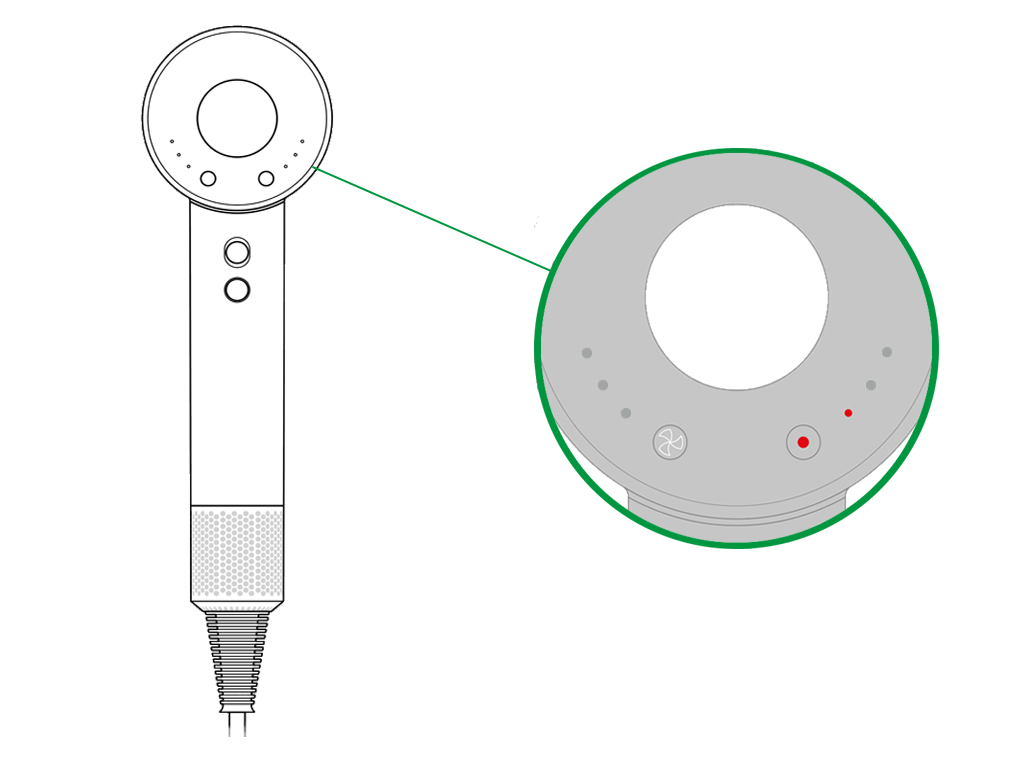
Even after proper cleaning, some users report problems. Most are fixable with the right steps.
Fix Blinking White Light Errors
A blinking white light after cleaning usually means one of three things. First, moisture in the filter or housing requires letting the filter dry for 24 hours before reuse. Second, incomplete cleaning means you should soak the inner filter in hot water, scrub with a toothbrush, and rinse again. Third, hair wrapped around the motor shaft requires partial disassembly to remove.
Solve Power-On Issues
If the dryer doesn’t power on, check the filter and ensure it’s clean and reinstalled properly. Verify the magnetic connection is fully engaged. Test the outlet by plugging in another device. If all else fails, contact Dyson support as the issue may be internal.
Stop Overheating and Shutdowns
If the unit shuts off during use, clean the filter and housing as restricted airflow is the most common cause. Avoid prolonged maximum heat use and alternate heat and speed settings. Let the dryer cool fully before restarting.
Eliminate Burning Smells
A burning odor usually means debris is combusting in the airflow. Deep clean the filter and housing. If the smell persists, contact Dyson support as internal contamination may require professional service.
Replace the Filter When Necessary
The filter cage is durable but not indestructible. Replace it if the mesh is torn or bent, the magnetic connection fails, or it no longer seats securely.
Only use genuine Dyson replacement filters as third-party versions may not meet airflow or safety standards. The Supersonic Pro includes a spare filter, allowing you to swap and clean without downtime.
Prevent Performance Loss
A clean filter maintains your Dyson aerodynamic efficiency and motor lifespan. Neglect leads to 40 percent reduced airflow, 30 to 50 percent longer drying times, increased motor strain, and more frequent error lights.
Users who clean weekly report zero blinking lights and consistent heat output over two or more years. Those who skip maintenance often see failure within two years.
Use Genuine Dyson Accessories
Dyson offers tools and storage solutions to make maintenance easier and protect your investment.
Recommended Accessories
| Product | Purpose |
|---|---|
| Spare Filter Cage | Swap while cleaning, included with Pro model |
| Dyson Stand | Displays and protects the dryer |
| Travel Bag | Heat-resistant, prevents dust accumulation |
Get Support When Needed
If cleaning doesn’t resolve the issue, Dyson offers multiple support options.
Contact Customer Service
United States customers can call 1-866-693-9766 Monday through Friday 8am to 8pm CST. UK support is available at 0800-298-0298, and Australian customers can call 1800 239 766.
Online Resources
Access the Dyson Support Portal for user manuals, video tutorials, and troubleshooting guides. The MyDyson app provides cleaning reminders, expert guides, and chat support.
Avoid Warranty-Voiding Mistakes
Dyson’s two-year warranty covers defects but not damage from misuse. Avoid using non-genuine parts, operating without the filter, submerging the dryer in water, disassembling without authorization, or installing a wet filter.
These actions can void your warranty and lead to costly repairs.
Frequently Asked Questions About Cleaning a Dyson Hair Dryer
How often should I clean my Dyson hair dryer filter?
Cleaning frequency depends on usage. For routine home use, clean every one to two months. For daily use, clean once per week. For heavy product use or professional salon use, clean weekly or after every use.
Why does my Dyson hair dryer blink white after cleaning?
A blinking white light usually indicates moisture in the filter or housing. Let the filter dry completely for 24 hours before reuse. It can also mean the filter wasn’t cleaned thoroughly enough or there’s hair wrapped around the motor shaft.
Can I use alcohol wipes to clean my Dyson hair dryer?
No, never use alcohol-based wipes or harsh chemicals on your Dyson hair dryer. These can damage the finish and internal components. Use only a dry or slightly damp microfiber cloth.
What happens if I don’t clean my Dyson filter?
Neglecting the filter reduces airflow by up to 40 percent, increases drying time by 30 to 50 percent, causes overheating and automatic shutdowns, and can lead to premature motor failure within two years.
Can I put my Dyson filter in the dishwasher?
No, never submerge the dryer body in water or put the filter in a dishwasher. Only soak the filter cage itself in warm soapy water, then rinse and air-dry completely before reinstalling.
How do I know if my Dyson filter needs replacing?
Replace the filter if the mesh is torn or bent, the magnetic connection fails, or the cage no longer seats securely. Only use genuine Dyson replacement filters for safety and performance.
Key Takeaways for Maintaining Your Dyson Hair Dryer
Regular filter cleaning is the single most effective way to maintain your Dyson hair dryer’s performance, safety, and lifespan. Whether you use it daily or occasionally, a few minutes of maintenance every one to four weeks prevents 90 percent of common issues like blinking lights, overheating, and reduced airflow.
Always air-dry the filter completely before reinstalling to avoid electronic damage. Use genuine Dyson accessories and replacement parts to maintain warranty coverage and ensure optimal performance. Follow this guide to keep your Supersonic running at peak efficiency for five or more years.